

How to Keep AI out of your Google Searches
You've probably noticed Google's search results looking a bit different lately - a big AI-written summary sitting above the actual list of websites. Not everyone wants that. Google actually built in a way to skip it entirely, called the “Web” option, and most people have no idea it exists. We've written this guide to show you what it is and how to use it.
WHY WOULD YOU WANT IT?
The first thing to work out is WHY you'd want to skip the AI summary. For a lot of searches, it's a fine, quick answer. But there are times you'd rather see the actual websites first - checking sources for something important, comparing real reviews rather than a summary of them, or just because you'd prefer to make up your own mind rather than trust an AI's condensed version of the facts.
WHAT DOES THAT MEAN?
When you search Google normally, you're not just getting a plain list of websites anymore. You're also getting an AI Overview - a written summary Google's AI generates by reading a handful of pages and condensing them into one answer, sitting right at the top before any of the actual websites. The “Web” option switches this off. It shows you the classic Google results - just the websites, in the usual order, the way search worked for the last twenty-odd years. Google does this by adding udm=14 to the end of the search web address - a bit of technical shorthand that just means “web results only, please.”
HOW TO FIND IT
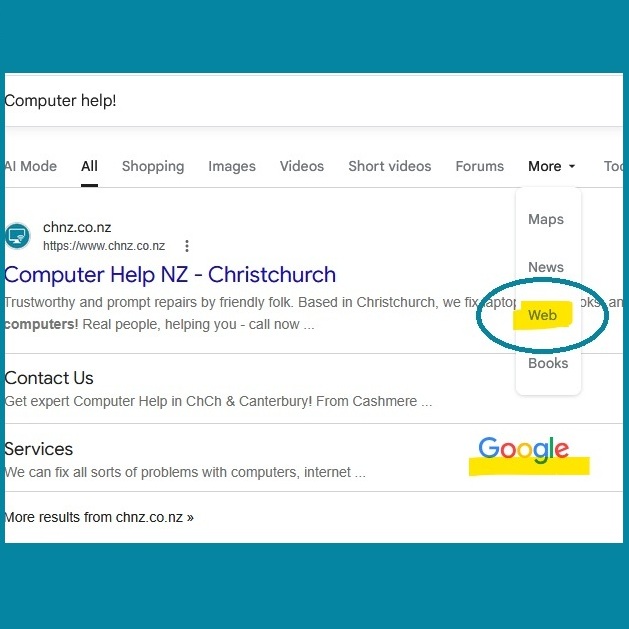
On both desktop and mobile, look for a More dropdown just under the search box, next to the Images and Shopping tabs. Click it, and Web is usually sitting in that list alongside Maps, News and Books.
Consider...
- On some searches, “Web” shows up as its own tab straight away, no clicking through More.
- On mobile, the filter row can shuffle around depending on what you searched for.
- If it's genuinely missing, searching normally and adding &udm=14 to the end of the web address does the same job.
MAKING IT YOUR DEFAULT
Clicking “More” every single search gets old fast. The trade-off question to ask yourself is “how much of my browsing time would this actually save me?” If the answer is “most of it,” it's worth setting up properly. Both Chrome and Firefox let you add a custom search engine using that same udm=14 trick, so typing a search straight into the address bar goes directly to the plain web results, no clicking required. We're happy to set this up for you if you'd like a hand.
IS IT WORTH SWITCHING?
Trap for consumers: leaving AI Overviews on isn't wrong, and for a quick fact it's often perfectly fine. But it does mean less traffic reaches the actual websites Google is summarizing - including small local businesses who wrote the page in the first place. If you'd rather support the real people behind what you're reading (that includes us!), and see sources for yourself rather than take an AI's word for it, the “Web” option is worth switching to as your default.
WE CAN HELP TOO
We're happy to point you in the right direction, but our greatest desire is just that you get to browse the way you actually want to. So, feel free to email us if you're not sure whether it's set up right.
If you'd like your browser set up to search the old-fashioned way by default, or just want a hand with anything else on your computer, give us a call.
Here to help.
The Team at Computer Help
160b Selwyn Street, Christchurch
www.chnz.co.nz